Admissions & enrolment
- Public application form
- Enquiries & leads
- Application register
- Entrance & scholarship forms
- Concessions
- Admission fee
- Placement & finalisation
- CSV export

Lancehawks School ERP · in production
Admissions to alumni — fees, attendance, hostel, transport, gate and the people who need to see it. Built for Indian schools and academies, implemented and run by us, with AI layered on wherever it earns its place.
What the live system holds today
From the live system at Chaitanya’s Academy — Baramati and Nagar campuses. Rounded down.
01 The honest starting point
Nothing here is a criticism of how you work. It’s what happens when an institution grows faster than its tools. The office knows one number, the hostel knows another, and the only person who can reconcile them is on leave.
What that costs is rarely one big failure. It’s the slow tax — fees chased by phone, attendance copied twice, a parent who finds out about an absence at dinner, and a trustee asking for a number that takes three days to produce.
02 In use
An ERP is really an institution’s clock. Here is one ordinary day on it.
Security guard · Campus app
Gate opens. Day scholars stream in; a parent arrives unannounced and is checked in against the visitor register with a photo, in about fifteen seconds.
Class teacher · School app
Attendance for the whole section is marked in one screen and submitted in a single tap. Guardians of absent students get a push notification before first period ends.
Head of school · Console
The morning dashboard, in one load: attendance today, which registers are still unmarked, dues outstanding, leave awaiting a decision, and which classes need a substitute teacher.
Head of school · Console
Two teachers are absent. Cover is assigned from the same screen, and it appears on the covering teachers' Today tab before they reach the staff room.
Parent · Anywhere
A father pays the second installment from a payment link on his phone. The receipt is instant, the ledger updates itself, and nobody in the office touches it.
Admissions desk · Console
An application that came in through the public form is placed into a class, quoted a fee, and finalised. The applicant becomes a student record — and if they need accommodation, they land in the hostel's Needs a Bed queue automatically.
Warden → Guard · Campus app
A hostel student is approved to go home for a wedding. The warden issues a gate pass; the guard marks the student out at the gate and back in on Sunday. The hostel leave register and the gate log are the same record — they cannot disagree.
Transport office · Console
Drivers submit the day's logs from their own app. A vehicle's insurance is expiring in eleven days, so it is already on the compliance digest that went out this morning.
Trustee · Console
Every one of those actions is in the audit log, with who did it and when. Nothing above required a phone call to find out.
03 On screen
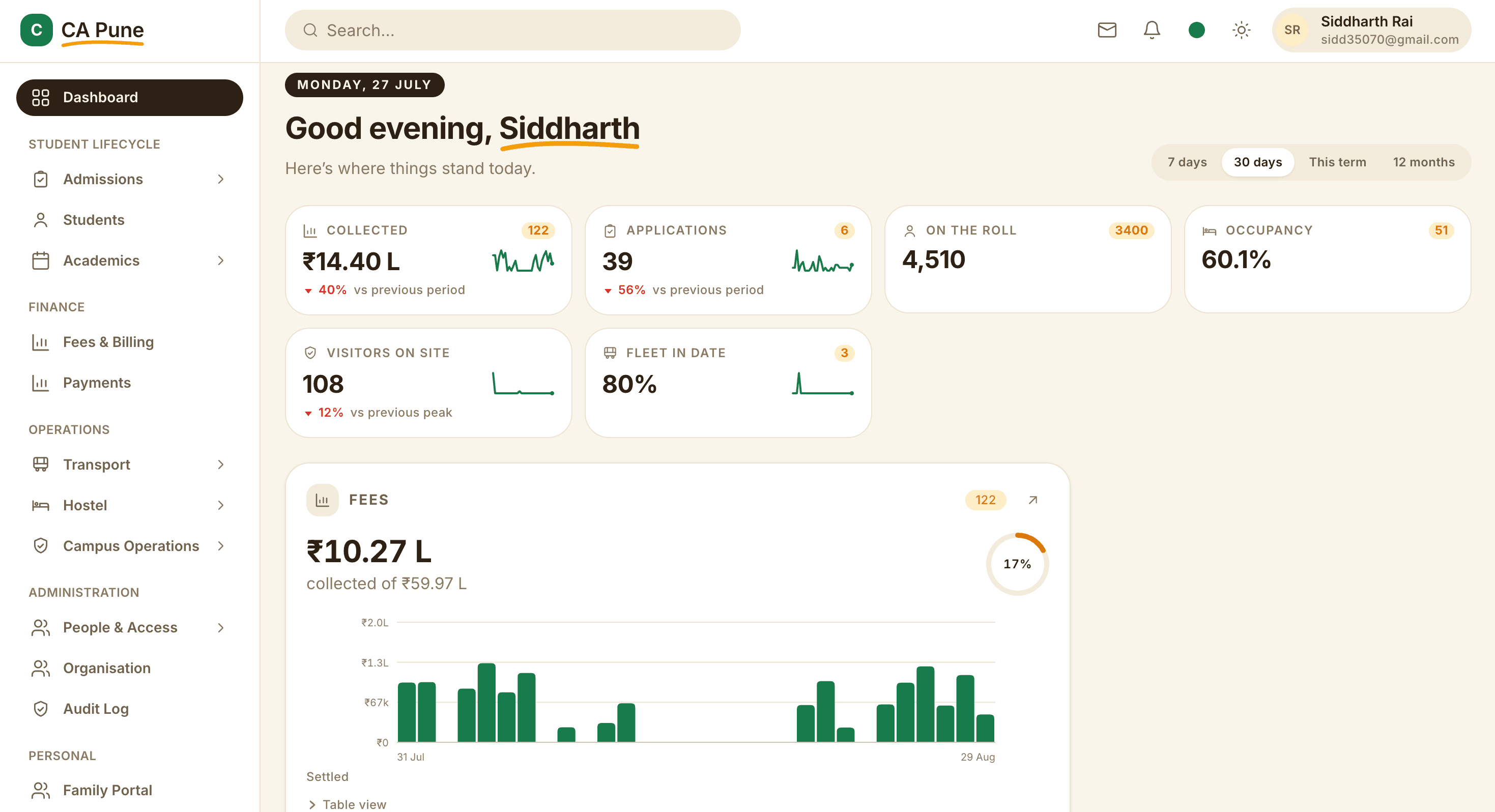
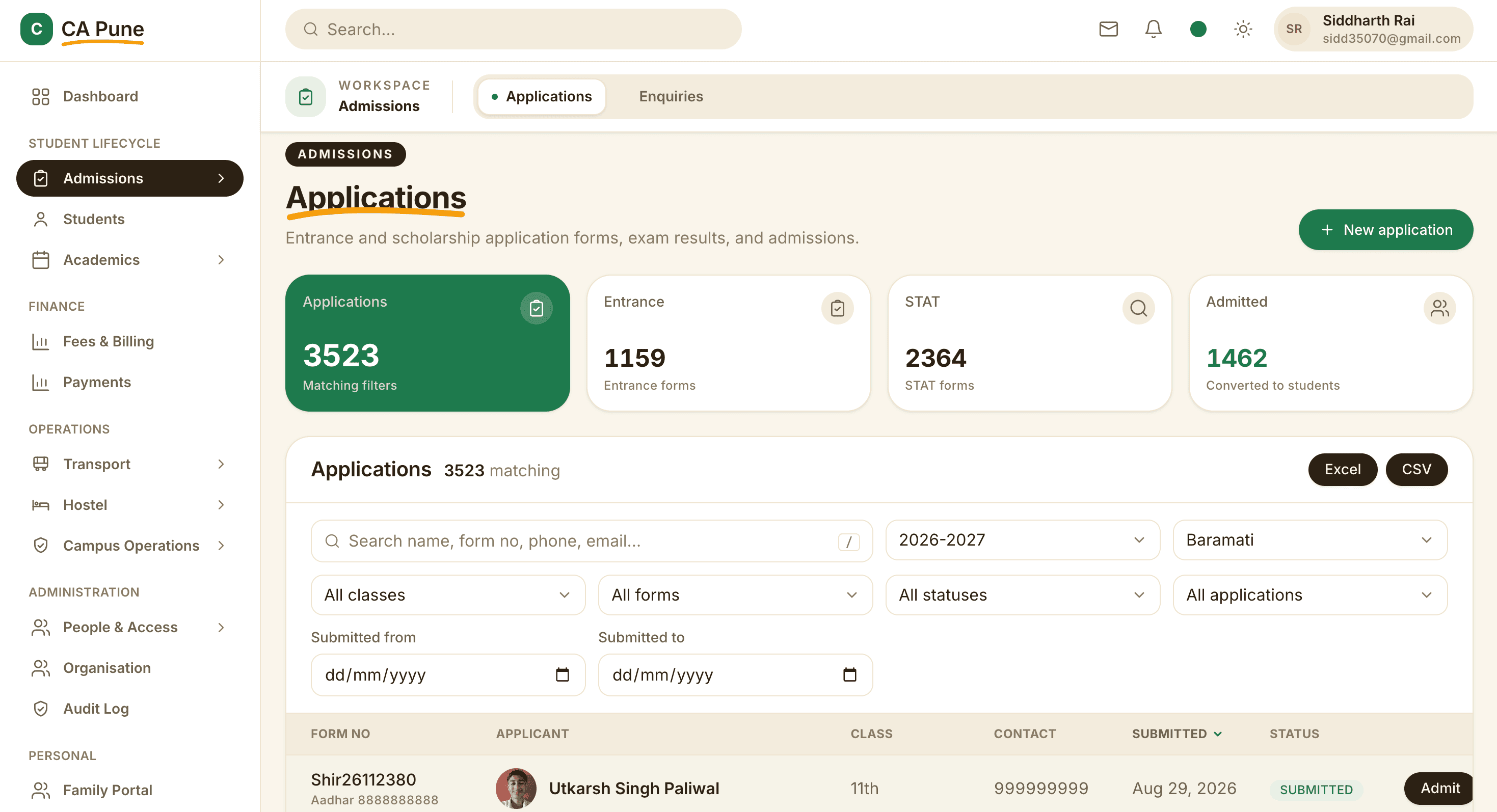
04 The system
Not a menu of add-ons. One platform where admissions already knows about fees, fees already knows about the hostel, and the hostel already knows about the gate.
05 Who gets what
A guard should not be handed the same software as a finance officer. Everyone gets a surface built for their job — and sees only what their role permits.
The full system for office staff, heads, and managers. Admissions, fees, academics, hostel, transport, campus operations and administration — with navigation that hides whatever a person has no permission to see.
Students sign in with a roll number and PIN — no email needed. Attendance, fees, homework, timetable, notices and leave. Guardians see the same, per child. Teachers get their register, classes, and a compose screen for notices and homework.
The movement of people around a residential campus. Presence, residents, gate passes, exits, the visitor register, and maintenance issues raised with a photo from where the problem is.
Trips, daily logs and fuel entries from the driver's own phone, in their own language. Works with no signal and syncs when it returns — which matters on a route.
06 The AI layer
Because every admission, fee and attendance mark lives in one place, agents can act on it safely. These are optional — we add them when they earn their place, with the office approving anything that reaches a family.
How we build agentsChecks who has already paid, drafts reminders in each guardian’s language and sends them once the office approves.
Answers enquiries overnight from your prospectus and fee structure, books counselling slots and hands warm leads to the office.
The head of school asks “which sections have attendance under 85% this month?” and gets the answer with the numbers behind it.
Birth certificates, transfer certificates and marksheets read and checked against the application before anyone opens them.
07 Trust
India's Digital Personal Data Protection Act puts extra duties on anyone who handles children's data, and a school handles little else. Role-scoped access, a searchable audit trail and a full export on request mean that when a parent, a trustee or an auditor asks who saw what, you can show them.
Every institution's data is separated at the application layer and again at the database layer. Two independent locks, not one.
15 roles and 92 distinct permissions. A warden sees their hostel. A class teacher sees their section. A guardian sees their own children. Access is checked on every single request, and defaults to refusing.
Every change — a mark amended, a fee waived, a pass approved — is written to an audit log with the person and the time, and is searchable. Disputes get resolved by looking, not arguing.
A class teacher can correct the same day. After that it takes a specific permission, and the correction is recorded. Approved leave marks a student excused automatically rather than someone remembering to.
Online payments post against the right installment automatically, through a verified gateway webhook. The ledger, the receipt and the bank settlement stay in agreement without anyone reconciling by hand.
No lock-in. Your records are yours: full export on demand, and on the way out a complete handover of your data with the documentation to go with it.
“Lancehawks didn’t just build us software — they took over our entire technology operations. We haven’t thought about IT since.”
08 Commercials
Most school ERPs fail not because of the software, but because someone on your staff becomes responsible for it — and they already have a job. We keep that responsibility.
₹35,000 – ₹3,00,000 per month
Depending on size, campuses and the modules you run. For most institutions that is less than a per-student licence plus the person you’d hire to run it.
One monthly retainer. Implementation, operations, maintenance and improvements included.
No per-seat licensing, no project fee, no change-request billing, no surprise invoices.
Typically one to two weeks from first conversation to kickoff.
No lock-in. Cancel at the end of any cycle and leave with a full export of your data.
Monitoring included. Critical issues get a response in hours, not days.
Students, applications and fee history come across with you, checked and balanced before you go live.
Next step
We map how your institution actually runs, show you where the hours go, and give you an honest answer on cost and timeline. If it isn’t a fit, we’ll say so.
30 minutes · free · no pitch deck